Thai App Center ขอแนะนำ Samsung Health
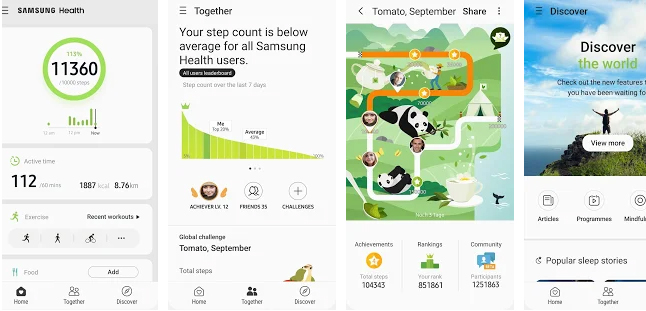
Samsung Health provides core features to keep up your body fit and healthy. It will record and analyze your daily activities and habits to help maintain successful diet and lead healthy lifestyle.
Whether you walk or run, hike or bike, play indoor or outdoor sports, you can add and track the various physical exercises and activities in a single step using the various built-in trackers.
Samsung Health helps to create a balanced lifestyle pattern by recording a variety of information like your food, caffeine and water intake details.
Manage health and environmental records such as heart rate, blood pressure, blood glucose levels, stress, weight & SpO₂ using built-in sensors and third party devices.
Set a goal for your Activity, Meals, or Sleep and go with it!
Check out your everyday activities at a glance!
You can easily add items that you want to measure and view records on the Home screen of Samsung Health.
Ask our experts if you have questions about your health! (Available in some countries only)
Compete with your friends and check your ranking. You can compete with your friends once your Samsung account is registered.
Check daily health news of your preference with customized news feed. Keep your body strong and healthy with tips offered by health professionals. (Available in some countries only)
Discover the best health and fitness apps that can connect with Samsung Health. Many health apps including ‘Technogym’ and ‘MyFitnessPal’ can be linked with Samsung Health.
Samsung Health protects your private health data securely. All Samsung Galaxy models released after August 2016, Knox enabled Samsung Health service will be available. Please be noted that Knox enabled Samsung Health service will not be available from rooted mobile.
Samsung Health requires Android 6.0 (Marshmallow)or later.
Tablets and some mobile devices may not be supported. Some functions may not be available based on regions/service providers/devices.
Samsung Health supports over 70 languages, including English, French, and Chinese. An English language version is available for the rest of the world.
Please note that Samsung Health is intended for fitness and wellness purposes only and is not intended for use in the diagnosis of disease or other conditions, or in the cure, mitigation, treatment, or prevention of disease.
The following permissions are required for the app service. For optional permissions, the default functionality of the service is turned on, but not allowed.
Required permissions
– None
Optional permissions
– Body Sensors : Used to measure heart rate, oxygen saturation, and stress
– Camera : When you add a friend using the Together feature, you can use the camera to scan a QR code, take photos of foods, recognize numbers on a blood glucose meter/blood pressure monitor, or video chat while receiving a telehealth service. (Available in some countries only)
– Contacts : Used to check if you’re signed in to your Samsung account
– Location: Your location data is collected when you are using the exercises tracker and the steps tracker.
– Microphone : You can make video calls while receiving a telehealth service. (Available in some countries only)
– Phone : Collect unique device IDs while you are using Ask Experts (a remote medical consultation service), only in the US
– Storage : You can import/export your exercise data, save exercise photos, save/load food photos, and upload photos saved while receiving a telehealth service. (Available in some countries only)
If your system software version is lower than Android 6.0, please update the software to configure App permissions.
Previously allowed permissions can be reset on Apps menu in device settings after software update.
Download Samsung Health
Android