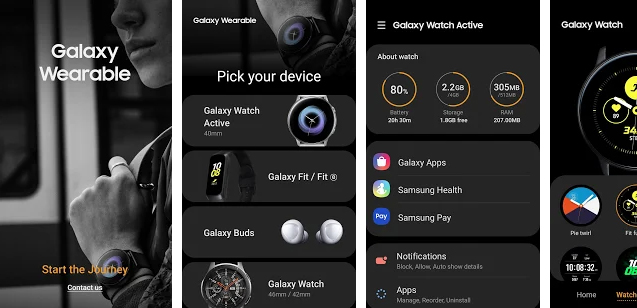
Thai App Center ขอแนะนำ Galaxy Wearable
The Galaxy Wearable application connects your wearable devices to your mobile device. It also manages and monitors the wearable device features and applications you’ve installed through Galaxy Apps.
Use the Galaxy Wearable application to set up and manage the following features:
– Mobile device connection/disconnection
– Software updates
– Clock settings
– Application download and settings
– Find my Watch
– Notification type and settings, etc.
Install the Galaxy Wearable application on your mobile device, then pair your wearable devices via Bluetooth to enjoy all of its features.
※ Settings and features provided by the Galaxy Wearable application are only available when your wearable device is connected to your mobile device. Features will not work properly without a stable connection between your wearable device and your mobile device.
※ The Galaxy Wearable application does not support the Gear VR or Gear 360.
※ The Galaxy Wearable application cannot be used with tablets. And supported devices vary depending on your region, operator, and device model.
※ Keywords: Galaxy Watch, GearS3, GearS2, GearSport, GearFit2, GearFit2Pro, Samsung, SamsungGear, Manager, Galaxy Wearable, Galaxy, Wearable
※ This application is for the Galaxy Watch, Gear S3, Gear S2, Gear Sport, Gear Fit2, Gear Fit2 Pro and Gear IconX.
※ Please allow the Galaxy Wearable application permissions in Android Settings so you can use all the functions in Android 6.0.
Settings > Apps > Galaxy Wearable > Permissions
※ App permissions
The following permissions are required for the app service. For optional permissions, the default functionality of the service is turned on, but not allowed.
[Required permissions]
• Location: Used to search for nearby devices for Gear through Bluetooth
• Storage: Used to transmit and receive the stored files with Gear
• Telephone: Used to check device-unique identification information for updating apps and installing plug-in apps
• Contacts: Used to provide services that need to be linked with accounts using registered Samsung account information
Download Galaxy Wearable
Android