Thai App Center ขอแนะนำ Image to Word – Picture Scanner with OCR
The best way to convert images to Word (docx) format right on your Android device. Just import the image or snap a photo of your notes, thesis, reports, resumes or other documents and simply extract text into editable Microsoft Word file. You can even use our built-in picture scanner with OCR which is more than just a picture scanner because it allows you to turn image to text on the go.
Use Image to Word to:
✔️ Convert pictures of reports, contracts, invoices, and more to editable Word format & get your work done faster since there’s no need for manual retyping.
✔️ Save time while cooking – scan your favorite recipes and convert output photo to Word for further adjustments and note adding.
✔️ Digitize your life & unclutter your office space by scanning notes, receipts, theses, and all sort of documents.
Some of Image to Word notable features are:
⭐ No limits on the file size or the number of converted files.
⭐ Screenshots can be converted as well.
⭐ Powerful image scanner with OCR.
⭐ Easily share converted documents anywhere.
⭐ Cloud services are supported (Dropbox, Drive, OneDrive, Box and more).
That’s not all:
⭐ The converted document is in the .docx format and immediately ready for further reuse.
⭐ Converted documents are editable so, you can quickly make small adjustments in any Word editor on your phone or computer.
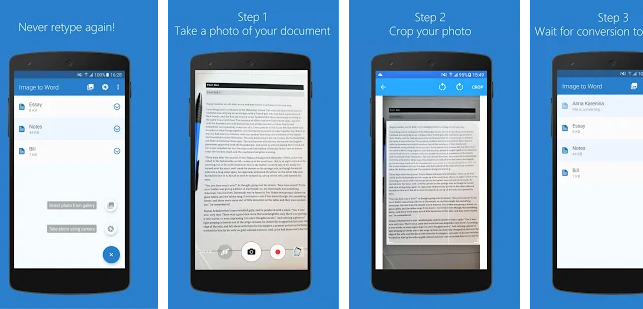
How to use Image to Word converter?
It takes only three simple steps to convert image to text:
1. Select the image you want to convert. It can be a JPG file from your phone, cloud services or you can quickly scan a photo.
2. If needed, it’s possible to crop or rotate the image.
3. Just wait for the conversion to complete and that would be all!
Note: Free conversions take up to 1 hour to complete, but fast conversions are completed in seconds. We do not guarantee that handwritten document conversion will be successful. For best results, use printed documents.
Download Image to Word – Picture Scanner with OCR
Android
iOS