Thai App Center ขอแนะนำ Polaris Office – Free Docs, Sheets, Slides + PDF
Already 90 Million Users Across The World, Get the Latest Android Office App For Free.
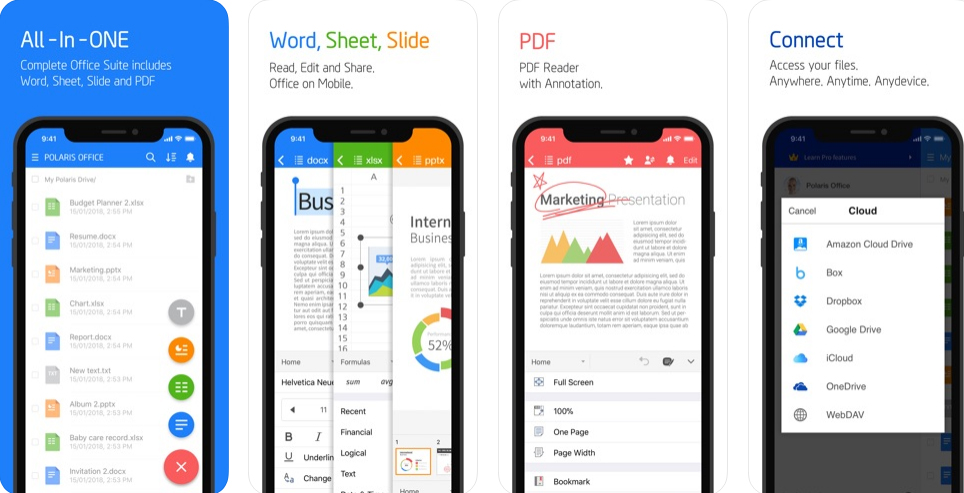
Experience New All-in-One Complete Office Suite compatible with MS Word, Excel, PowerPoint and Adobe PDF. “Editors’ Choice”, “2015 Best App”, and “Top Developer”awarded by Google Play.
■ Features ■
• Supported File Formats : DOC, DOCX, XLS, XLSX, PPT, PPTX, PPS, PPSX, TXT, HWP, ODT and PDF.
• Supporting 18 global languages including English, French, Arabic, Japanese, Russian, German, Italian, Spanish, etc
• Polaris Drive is a default cloud but also available other cloud service such as Google Drive, Dropbox, Box, OneDrive.
• Polaris Office now only supports KitKat 4.4 and above.
Compact – Only 60 MB Size. Just one application enough for all different type of documents.
• You can open, edit and save all type of office files such as word, excel and powerpoint by one android office app installed.
Compatible – Fully Compatible with Microsoft Office, PDF Reader & Converter.
• Open all file formats such as Microsoft Word, Microsoft Excel, Spreadsheet, Microsoft PowerPoint, Slide, and Google Docs.
• View PDFs right from your Android phone and save as PDF files from other type of documents.
Creative – Improve your skill, enhance your creativity with handwriting input.
• Draw and edit your idea with your own hands. Let you write on screen as though you were writing on actual paper.
• Directly, take pictures from camera to documents or insert video clips from your Android phone.
Connect – Quick and Easy Access for Anytime, Anywhere and Any device.
• Across all devices like Desktop, Tablet and Android phone, Keep your all documents always up-to-date in sync via Polaris Drive or other cloud service.
Collaborate – Writing notes directly with your hands then sharing your idea easily.
• Just simply sharing the link of documents with our cloud storage via SMS, email, Facebook and other channels.
• Leave your comments right away even PDF files and invite your colleagues to in-app communication to discuss revision before printing it out.
[Payment plan and auto-subscription]
• Polaris Office is free all-in-one office suite but some features can be limited by your cloud usage or your subscription option. Generally, you can use more features with reasonable price, please check details on polarisoffice.com/pricing
• You can upgrade to the Smart Plan ($3.99/month & $39.99/year) or the Pro Plan ($5.99/month & $59.99/year) to take the advantage of even more premium functions. (The price is based on US dollar. The actual price may differ depending on currency of each countries.)
• You can remove advertisement by purchasing Remove Ad for $4.99.
• Recurring payments and plan subscriptions are automatically processed. Your subscription will automatically renew.
• If you would like to stop your subscription, please cancel your subscription any time within 24 hours before the next renewal date. Subscription cancellation is available within the Google Play Store app details page or Google Wallet. (Reference: support.google.com/payments/answer/6220303?hl=en)
[Information about permission]
1) Necessary Permission to Access
• WRITE_EXTERNAL_STORAGE : This permission is required to read saved documents in Android SD card.
• READ_EXTERNAL_STORAGE : This permission is required to edit saved documents in Android SD card or move documents from other storage to SD card.
2) Selective Permission to Access
• GET_ACCOUNTS : If you would like to connect to Google Drive, this permission is required to use your current account.
• Bluetooth : This permission is required to edit documents through Bluetooth devices.
[Note]
• Official Site : Polarisoffice.com
• Support : [Application] – [Settings] – [Customer Support] or [Official Site] – [Support]
• Privacy & Terms : www.polarisoffice.com/privacy
Download Polaris Office – Free Docs, Sheets, Slides + PDF
Android
iOS